The AVERAGEX DAX Function: Syntax, Real Examples, and When It Beats AVERAGE

AVERAGEX is a DAX iterator that evaluates an expression once per row of a table, then returns the average of those per-row results. It solves a fundamental limitation of AVERAGE: while AVERAGE only accepts a column reference, AVERAGEX allows you to average calculated expressions, filter on the fly, or aggregate across virtual tables.
Key Takeaways
- ✓ AVERAGEX takes a table and an expression, not a column. It calculates that expression for every row, then averages the results. That's what makes it the right tool whenever the value you need doesn't already exist as a stored column.
- ✓ AVERAGEX ignores blank results but keeps zero results. Row-level expressions that return BLANK() get dropped from both the total and the count. Rows that genuinely evaluate to 0 stay in, and they pull the average down.
- ✓ It can average across a virtual table, not only the physical rows of a real one. That's how you calculate something like “average revenue per customer” instead of “average revenue per order.”
- ✓ AVERAGE is just AVERAGEX with the expression set to a single column. If a stored column already holds the value you're averaging, reach for AVERAGE. It's simpler and typically faster.
- ✓ Because it iterates row by row, AVERAGEX can get expensive on very large tables when the expression itself is heavy. Worth knowing before dropping one into a measure that scans millions of rows.
What AVERAGEX Actually Does
AVERAGEX solves a problem AVERAGE can't touch. AVERAGE only accepts a column reference. The moment you need to average something calculated — revenue per order, margin per unit, a ratio that doesn't exist as its own field — AVERAGE simply won't compile. AVERAGEX fills that gap.
AVERAGEX is a DAX iterator that evaluates an expression once per row of a table, then returns the average of those per-row results. Here's the syntax:
AVERAGEX(<table>, <expression>)Two arguments, always. No exceptions. The table can be a physical table, a filtered version of one, or a virtual table built on the fly with something like SUMMARIZE or ADDCOLUMNS. The expression runs inside each row's context before the averaging happens. That row context is the whole reason this function exists. It lets you calculate something per row that no stored column captures.
The Sample Dataset
Every example below uses the same OrderLines table. It's 12 rows across four customers, with CustomerID, Quantity, UnitPrice, and Discount. None of these columns store revenue directly, and that's deliberate. It's exactly the situation where AVERAGE can't help and AVERAGEX can.
| OrderID | CustomerID | Quantity | UnitPrice | Discount |
|---|---|---|---|---|
| 101 | Nova Traders | 4 | 60 | 0 |
| 102 | Nova Traders | 2 | 60 | 10 |
| 103 | Brightline Co | 1 | 250 | 0 |
| 104 | Brightline Co | 3 | 250 | 75 |
| 105 | Brightline Co | 5 | 250 | 0 |
| 106 | Pinehill Retail | 10 | 15 | 0 |
| 107 | Pinehill Retail | 0 | 15 | 0 |
| 108 | Pinehill Retail | 6 | 15 | 9 |
| 109 | Summit Goods | 2 | 90 | 0 |
| 110 | Summit Goods | 1 | 90 | 0 |
| 111 | Summit Goods | 4 | 90 | 36 |
| 112 | Nova Traders | 3 | 60 | 0 |
Row 107 is worth a second look. It's a real order, a cancellation that still got logged, with a quantity of 0. Keep that in mind. It matters later.
Example 1: Averaging a Calculated Value AVERAGE Can't Reach
Avg Order Revenue =
AVERAGEX(
    OrderLines,
    OrderLines[Quantity] * OrderLines[UnitPrice] - OrderLines[Discount]
)
There's no Revenue column in this table. AVERAGEX calculates Quantity × UnitPrice − Discount fresh for each of the 12 rows, then averages the results. Verified against the full dataset, that comes out to 294.17. Try writing AVERAGE(OrderLines[Revenue]) instead. DAX rejects it outright, because there's nothing there to reference.

Example 2: Why Order 107 Behaves Differently Depending on the Expression
Swap the expression to something that can produce a genuine BLANK: revenue per unit, using DIVIDE to guard against dividing by zero.
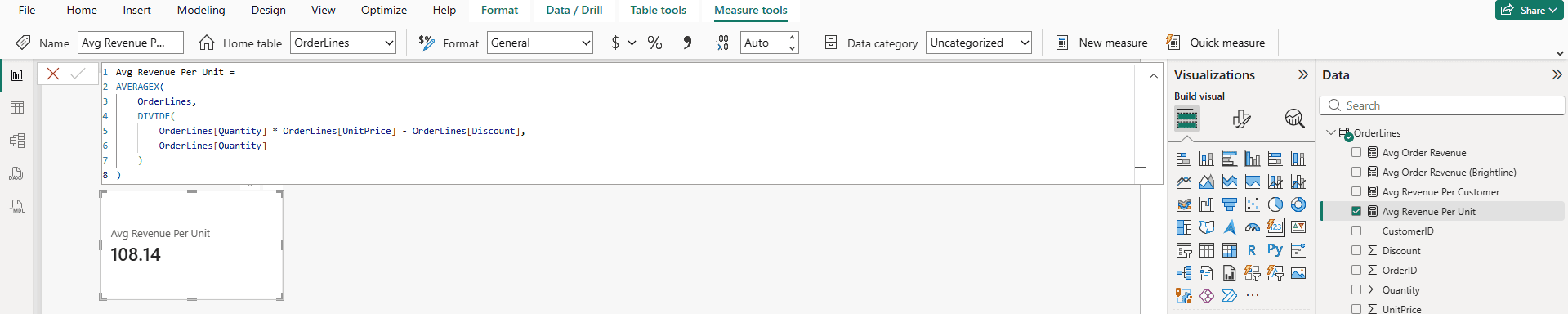
Avg Revenue Per Unit =
AVERAGEX(
    OrderLines,
    DIVIDE(
        OrderLines[Quantity] * OrderLines[UnitPrice] - OrderLines[Discount],
        OrderLines[Quantity]
    )
)
Order 107 has a quantity of 0, so DIVIDE returns BLANK for that row instead of an error. AVERAGEX drops that row from the calculation entirely. Both the sum and the count skip it. Across the remaining 11 rows, this measure returns 108.14.
Here's the part that trips people up. Imagine that same row's expression had instead been written to return a literal 0, say with a fallback value baked into the formula rather than relying on DIVIDE's natural BLANK. AVERAGEX would count it. The result drops to 99.13 across all 12 rows, because a zero-valued row still occupies a slot in the denominator while a blank one doesn't. AVERAGEX isn't being inconsistent here. It's applying one rule precisely: blank results get excluded, zero results don't.
Example 3: Filtering with CALCULATE
Avg Order Revenue (Brightline) =
CALCULATE(
    AVERAGEX(
        OrderLines,
        OrderLines[Quantity] * OrderLines[UnitPrice] - OrderLines[Discount]
    ),
    OrderLines[CustomerID] = "Brightline Co"
)
Brightline Co's three orders, 250, 675, and 1,250, average out to 725. CALCULATE narrows the table AVERAGEX iterates over before the row-by-row calculation runs, the same way it would for any other aggregation.

Example 4: Averaging Across a Virtual Table
This is where AVERAGEX does something AVERAGE structurally cannot. It can answer “what's the average revenue per customer” instead of “what's the average revenue per order.”
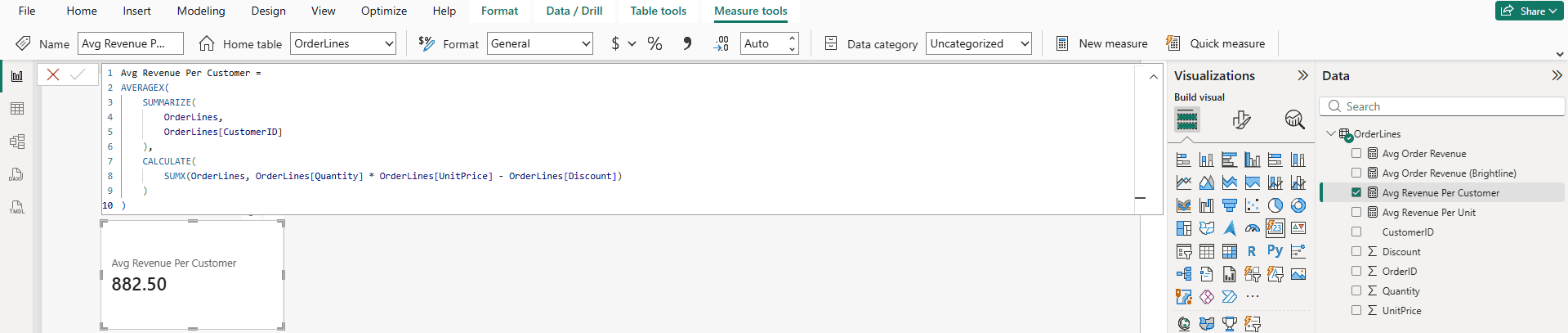
Avg Revenue Per Customer =
AVERAGEX(
    SUMMARIZE(
        OrderLines,
        OrderLines[CustomerID]
    ),
    CALCULATE(
        SUMX(OrderLines, OrderLines[Quantity] * OrderLines[UnitPrice] - OrderLines[Discount])
    )
)
SUMMARIZE builds a virtual table with one row per customer. For each of those four rows, the inner CALCULATE-wrapped SUMX totals that customer's revenue across every order they placed. AVERAGEX then averages those four customer totals: 530 for Nova Traders, 2,175 for Brightline Co, 231 for Pinehill Retail, and 594 for Summit Goods. That lands on 882.5.
Compare that to Example 1's 294.17. The gap makes the point. Averaging per order and averaging per customer answer genuinely different questions. Only AVERAGEX can pivot between them without restructuring the underlying model.
Example 5: When AVERAGEX Is the Wrong Tool
Suppose Revenue already existed as a calculated column in this table, computed once when the model refreshes rather than row by row every time the measure runs. Example 1's measure should then be rewritten as plain AVERAGE(OrderLines[Revenue]). Same result, less iteration overhead.
AVERAGEX earns its keep when the calculation genuinely depends on row context that doesn't exist as a column yet, or when it's aggregating over a virtual table like Example 4. Reaching for it out of habit on a column that's already sitting there just adds iteration cost for no benefit.
Core Rules and Default Behavior
- • Two required arguments, always. A table and an expression. There's no single-argument form; that's what AVERAGE is for.
- • Blank expression results are excluded from both the sum and the count. Zero expression results are included in both. Example 2 demonstrates this distinction directly.
- • The table argument accepts virtual tables. SUMMARIZE, ADDCOLUMNS, FILTER, and similar functions can all build the table AVERAGEX iterates over. That's what makes per-group averaging possible.
- • AVERAGE is functionally AVERAGEX with a column as the expression. Anywhere a stored column already holds the value, AVERAGE is the simpler and generally faster choice.
- • Row context exists inside the expression. Column references inside it resolve per row, not across the whole table. Same behavior as SUMX, MAXX, and the other X-suffixed iterators.
In Practice
A regional sales manager wants two numbers side by side on a dashboard: average revenue per order, and average revenue per customer account. The first is a straight AVERAGEX over the order-level table, identical in shape to Example 1. The second needs Example 4's SUMMARIZE pattern, because “per customer” isn't a row in the orders table. It's a grouping that has to be built before AVERAGEX can average across it.
Skip that distinction and it's easy to build one measure, see a reasonable-looking number, and never realize it answers the wrong question. A manager reading “average revenue per customer: 294” would be looking at the per-order average mislabeled. That's less than a third of the real per-customer figure of 882.5 from this exact dataset.
Common Mistakes
Mistake 1: Passing a column where a table is expected
AVERAGEX(OrderLines[Quantity], OrderLines[Quantity]) fails, because the first argument has to be a table, not a column. The fix is almost always using the table name on its own: AVERAGEX(OrderLines, OrderLines[Quantity]).
Mistake 2: Assuming AVERAGEX treats blanks and zeros the same way
They're handled differently on purpose, as Example 2 shows. A DIVIDE-guarded expression that naturally produces BLANK for invalid rows behaves differently than one that falls back to a literal 0. Which one a formula uses changes the result, and not merely how it reads.
Mistake 3: Reaching for AVERAGEX when a stored column already has the value
It works, but it's doing unnecessary row-by-row iteration for a result AVERAGE would return identically, with less overhead.
Mistake 4: Building the wrong grouping level
Averaging per order and averaging per customer, per day, or per product are different calculations that happen to share the same function. Getting the table argument's grain wrong, iterating orders when the question is really about customers, produces a number that's technically correct for a question nobody asked.
Frequently Asked Questions
What does the AVERAGEX function do in DAX?
It evaluates an expression once for every row of a table, then returns the average of those per-row results. Useful whenever the value being averaged isn't already a stored column.
What's the difference between AVERAGE and AVERAGEX?
AVERAGE takes a single column and can't evaluate a formula. AVERAGEX takes a table and an expression, letting you average something calculated fresh for each row.
Does AVERAGEX ignore blank values?
Row-level expression results that evaluate to BLANK are excluded from both the total and the count. A result of exactly 0 is not excluded. It's counted normally.
Can AVERAGEX average by a grouping like customer or category instead of by row?
Yes, by passing a virtual table built with SUMMARIZE or a similar function as the first argument, with one row per group instead of one row per record.
Is AVERAGEX slower than AVERAGE?
On a column that already stores the value you need, yes. AVERAGEX does row-by-row iteration that a plain AVERAGE skips entirely. On genuinely calculated values, there's no AVERAGE alternative to compare against in the first place.
Why does my AVERAGEX measure give a different number than AVERAGE on the same data?
Usually because the underlying expressions aren't equivalent. A common cause is the blank-versus-zero handling from Example 2, where the same row contributes differently depending on how its expression is written.
Can I nest AVERAGEX inside CALCULATE?
Yes. CALCULATE narrows the filter context before AVERAGEX runs, the same pattern used with any other aggregation function.

Vivek Dhumal
BI Consultant
BI Consultant & Power BI Developer
Vivek Dhumal is a dedicated BI Consultant and Data Analyst specializing in Power BI development, DAX calculations, SQL data modeling, ETL automation, and scalable business intelligence solutions.